

Boat Reservations
To reserve boats efficiently, improve boating safety, and provide boat use information for reporting purposes, we use Google calendar in association with the Gmail accounts most University students, faculty and staff are using at Southeastern. The Boat Reservation process is now more simple and easy than ever before. After a faculty, staff or student person has taken the Turtle Cove Boating Safety Class (initial class is 6 hours long, thereafter every three years it is a 30 minute on-line refresher) you will be invited to share in the Turtle Cove Calendar. Once you accept, all you need to do is reserve and write in information in the Turtle Cove Google Calendar. If you have any problems making your reservation, email Robert Moreau [rmoreau@southeastern.edu].
Note
You must complete the Turtle Cove Boating Safety course before you can reserve a boat. Contract Robert Moreau at rmoreau@southeastern.edu for information on when the next Boating Safety Class will be taught on campus.
STEP 1: Access Google Calendar
For all Southeastern faculty/staff/students using Southeastern's Gmail system, the
Turtle Cove Google Calendar (actually, its "entries") should automatically be available to
you. So, when in Southeastern's Gmail, click onto "Calendars" at the upper right of
your screen (in the 9-dot tic tac toe square diagram). If you do not use Southeastern's
Gmail system (of if you are another state-certified boat user of Turtle Cove boats
outside of the Southeastern system), simply email Rob Moreau (rmoreau@southeastern.edu) and request to be "invited" to the Turtle Cove Google Calendar. Rob will send you
an email inviting you to join the calendar---you should gain access shortly after. 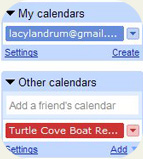
Once "in your Google Calendar," you should see your personal Google Calendar entries as well as the Turtle Cove entries in the color codes for each that you select (for instance, Rob uses "blue" for his personal calendar entries and "green" for his Turtle Cove entries---other calendar entries like "Holidays" may also show up). Choose various settings such as how you like to view the calendar (by month, week or day----Rob likes the monthly view). The settings button is at top right of calendar.
STEP 2: See What Boats are Available,
Then Reserve a Boat
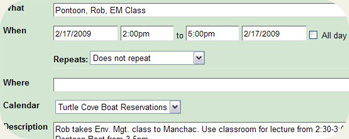
The purpose of the Turtle Cove Google Calendar is two-fold: first is to see what boats are available---second is to make your reservation. If you want to reserve the Blue Boat for a particular day from 8am to noon, first look at the calendar on that date to see if the Blue Boat is available (i.e., has it already been signed out?). Then click onto that date and a text box of sorts appears: in the first line of the text box type in "John Doe, Blue Boat, 8am-12pm." AGAIN, MAKE SURE TO CHOOSE THE TURTLE COVE BOAT RESERVATION CALENDAR in the drop down menu--this is the calendar that everyone can see and needs to see so that they know what boats are available, who is using them, etc. (the default calendar is your own personal calendar--only you can see it unless you choose to share it with others).
STEP 3: Fill in Description Box with
Important Information about your trip
You can go down to "Description" to enter in more info, or if you already closed out, go back in and click the "edit" button that gets you into edit mode, and also allows you to see the "Description" box. This is very important---fill in as much information as you can about your reservation and trip. At a minimum, the following information should be stated in the Description Box:
-your name and the "group name" or "class" of your trip and How Many People in boat (or if you and a couple of other people, list their names out).
-Your cell phone number (and another one in the group) in case of emergency
-Emergency Contact persons (in case you don't come home, who will know to call us or who we will know to call)
-Overall weather conditions forecasted for your trip (i.e., "weather looks good, no high winds or t-storms"--you should check weather within 24 hours of going out)
-Which boat are you using
-For what purpose (research, education, outreach, etc.)
-Basic route of your trip (i.e., "Galva Canal to Turtle Cove then on to Tangipahoa River and back to Galva Canal).
DON"T FORGET TO HIT "SAVE"