
Technology Resources
Click Here for a Printable Version of the Faculty Orientation Flyer
Email Policy:
Email is considered an official form of communication at the University. The University Email Policy ensures that students will have access to a university email account, outlines the student's responsibilities in having such an account, and establishes expectations for communication between faculty and students for educational purposes and between the University and students for university business purposes. You should read and be familiar with this policy https://www.southeastern.edu/resources/policies/policy_detail/network_id_email_account_deprovisioning.html
LEO - Linking Efficiently Online:
LEONet is the name given to our administrative system for Student Administration. Southeastern utilizes Oracle for the relational database support and PeopleSoft for the student administrative system software. By clicking on the LEONet link from the My Den web page, you are taken directly to the LEONet login screen. For easy to understand how-to directions you may access LEO’s “How Do I” page at http://www.southeastern.edu/resources/howdoi/index.html Topics include how to enter the LEONet system or entering grades and removing advising blocks.
Workday:
Workday is the cloud based system used for Human Resources, Payroll, and Financials. To access Workday, log into Webmail, click the Google applications icon, scroll down the list and click on the Workday icon.
User Account for Registration, Email, Moodle and Active Directory:
Upon enrollment or employment at Southeastern, you are issued a Southeastern identification number, otherwise known as the “W” number. This “W” number (a W followed by 7 numbers) is unique to each student/faculty/staff and has a variety of uses. The “W” number is used to identify individuals on all documents throughout the entire Southeastern experience. Listed below are four accounts that use the “W” number.
- LEONet - post grades, remove advising blocks, etc.
- The free, Southeastern issued, email address. An example of how an address would look is Firstname.Lastname@southeastern.edu. This same email account has an “alias” address of Firstname.Lastname@southeastern.edu. It is recommended that you use the alias address in your correspondance.
- Moodle uses their “W” number to login.
- Active Directory network login.
Passwords:
All four accounts (LEONet, Email, Moodle and Active Directory) have a preset password that is (Capital) S plus the eight numbers of your birthday with dashes in between. An example would be (Smm-dd-yyyy). It is required that the first time you log into one of these systems, that you change your password to something more private and secure. Passwords are case sensitive. LEONet, Email, Moodle and Active Directory share the same password. If you change your password in the email system, it will change in all four. https://adio.selu.edu/pwm/private/login
WebMail:
WebMail is a web-based mail client that offers the flexibility of accessing your Southeastern email from any computer with access to the Web. To access the WebMail link, go to http://www.southeastern.edu, and click “My Den.” Google Workspace Apps are available to all students, faculty and staff. Google Workspace is a collaborative set of tools that allows for the sharing of documents, spreadsheets, forms, presentations and calendars.
Two Factor Authentication (2FA) is a way to significantly increase security for both
you and for the University by adding an extra step for logging into Southeastern systems.
It was successfully implemented for faculty and staff in the Fall of 2019. There
is a small grace period to enroll in 2FA but you will get locked out of your account
if it does not get set up during the grace period.
If you have not enabled two-factor authentication, please do so now by following these instructions.
http://www.southeastern.edu/admin/cc/2sv/index.html
This is a simple process which adds an additional security measure on your Google account. In addition to your password, you’ll also need a one-time code for your initial login, whenever you change your password, or whenever you log in to a new device to access your account.
A personal email account should be used for personal emails and other online account logins, as your university email is only available to you while you are a current student, faculty or staff member. Your email will be deactivated the day your employment ends with the university.
On the WebMail login page click on Account Information And Password Change to use an important feature called Question/Answer, which will prevent you from having to go on campus to the Client Services Help Desk in McClimans Hall, Room 111, and show a picture ID to get your password changed. Once you’ve entered your W number and password you’ll see one of the selections “Password” with a question mark next to it. Click on the question mark for instructions on using this feature. If you have any questions or problems with using WebMail, please contact the Help Desk at extension 5555.
Computer Help Desk:
The Client Services Help Desk - 549-5555 provides technical support to faculty/staff. The Client Services Help Desk provides assistance for software and internet questions and takes service requests for hardware, software, telephone and network problems over the phone, in person at Room 111 McClimans Hall or by email at helpdesk@southeastern.edu. Visit the Client Services Help Desk’s web page at http://www.southeastern.edu/hd for more information about their staff and services including computer training classes.
Windows Security:
All computers on campus are protected by Windows Security and automatic updates of virus definitions have been implemented.
Web Site:
For information on Southeastern's web publishing policies and resources, visit http://www.southeastern.edu/webpublishing/
AV Classrooms:
Classrooms on and off campus have been equipped to handle remote learning. Southeastern has over 130 AV classrooms that allow for remote learning. These classrooms are equipped with projectors, PCs, monitors, controllers/switches and webcams in order to support faculty instruction. These classrooms are located at the Baton Rouge School of Nursing in addition to the main campus.
STUDENT TECHNOLOGY FEE RESOURCES:
Thanks to the Student Technology Fee http://www.southeastern.edu/admin/stf/index.html
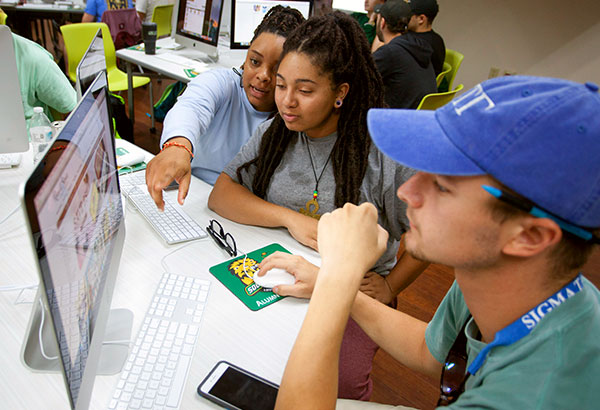
many technology resources are available for students including computer labs. Several Student Technology Fee state-of-the-art computer labs are available on campus to train, assist, and serve all Southeastern students with technology in a positive environment; thus providing a value-added component to enhance their academic achievements and workforce preparation. An open lab (Student Technology Center) with over 70 seats and color printing is available to all students and majors in Fayard Hall 126, 127, and 129. For a list of all available Southeastern computer labs visit:
http://www.southeastern.edu/admin/sps/labs/index.html
Think Before You Print:
Student computer labs are equipped with a print release system, where students monitor and manage their print jobs. Each semester students are allocated prints based on the number of academic hours they are taking. When a job is selected at a computer for printing, that job will be held by the system until the individual authorizes it to be released. For more information about student printing, visit http://www.southeastern.edu/admin/sps/printing/index.html
The Southeastern Wireless Network:
The Southeastern Wireless Network is available to all Southeastern students, faculty, and staff. To find out more about connecting to our wireless network, visit http://www.southeastern.edu/admin/cc/wireless/index.html
Student and Graduate Technology Assistants:
We employ nearly 100 Student and Graduate Technology Assistants each year. Some of the positions are computer lab attendants and coordinators, check out equipment coordinator, student help desk telephone support, supply distributors, technology interns and liaisons and hardware and software technical support. University and departmental training classes are conducted for all Student Technology Fee student workers and Gas in order to provide knowledgeable support to their peers. Students can apply for these positions online. http://www.southeastern.edu/admin/sps/jobs/index.html
Student Help Desk:
The Student Technology Help Desk is available on the web at http://www.southeastern.edu/admin/sps/helpdesk/index.html or to get technical support via the telephone call 985-549-2700. Assistance is provided with basic Moodle issues, internet questions, Southeastern related information, tech fee supported software applications issues, email account questions and a variety of other technical and student related issues.
Mane Media Equipment Check Out:
Laptops, projectors, digital cameras, digital video cameras, graphing calculators, tablets, chromebooks, charging cords, and tripods are available for check out by students. To find out the procedure for your students to check out this equipment, either call 985-549-2165, visit the Student Technology Center in Fayard 127, or visit http://www.southeastern.edu/admin/sps/manemedia/index.html
Large, Small and Surplus Computer Proposals:
A brief description of each type of proposal is provided below. For additional information and to access the forms for submission, visit http://www.southeastern.edu/admin/stf/index.html
Large Project Proposals:
A limited amount of funds is earmarked annually for technology applications that are larger in total cost. A large project is defined as one where the requested amount is over $5,000. A Call for Proposals is issued in the Fall semester using a rotating schedule to determine which departments are eligible to submit proposals.
Small Project Proposals:
A limited amount of funds is earmarked annually for technology applications that are small in total cost. A small project is defined as one where the requested amount is $5,000 or less. A Call for Proposals is issued in October and February using a rotating schedule to determine which departments are eligible to submit proposals.